


The best account
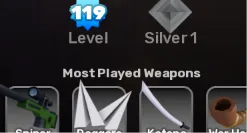
14 people are viewing this item
Buyer protection
Your purchase on the Eloboost24 platform is fully protected by our Buyer Protection Policy.
- Refund to your balance if not delivered
- Secure payment
About seller

sathwikolt
RegularThe best account
Item type
Weapons
FAQs about Items
What kind of Rivals items can I buy?
On EB24 you can buy weapons, crates, cosmetics, bundles, and seasonal content for Rivals. Each listing describes the item type, rarity, and what the offer includes, so you know exactly what you are getting before you reach checkout.
How does Rivals item delivery work?
After your order is confirmed, delivery instructions appear directly in your order panel. The item is delivered through the method listed for that offer, following a clear set of steps so you can complete the exchange without confusion.
How long does delivery take?
Each listing shows an estimated delivery time, which depends on the type of Rivals item. Common cosmetics and crates tend to be fast, while larger bundles can need extra coordination. The timeframe is always displayed before you buy so there are no surprises.
Do I need to share my account access?
You do not need to hand over long-term account access. Rivals items are delivered through the agreed method shown on the listing, which keeps your account in your control throughout the process.
Are Rivals bundles and cosmetics priced fairly?
Prices reflect item rarity, bundle scope, and demand. Listings are organized across clear price levels, so you can compare a single cosmetic against a full seasonal bundle and choose what fits your budget.
What if my Rivals order goes wrong?
If a delivery does not match the listing or the stated time, you have buyer protection. Open the automated dispute form from your order panel and the system reviews the case to resolve it clearly and fairly.
How it works?
Buying Rivals weapons, crates, and cosmetics on EB24 is straightforward. Pick the item you want and complete checkout. You then receive it through the delivery method shown on the listing.
Browse Available Items Look through EB24 Rivals listings for weapons, crates, cosmetics, bundles, and seasonal content. Each listing details the item type, rarity, and what is included so you know exactly what you are getting.
Complete the Purchase Once you finalize your order through EB24 secure checkout, all order details and the current status appear on your dashboard.
Review Delivery Instructions Delivery instructions appear in your order panel right after checkout. They explain the transfer method for your Rivals items and the steps to follow.
Receive the Item In-Game Your Rivals items are delivered through the agreed method without handing over long-term account access. Follow the instructions to complete the exchange.
Order Protection If a purchase does not match the listing, open an automated dispute from your order panel. It is part of your buyer protection, and the system resolves the issue fairly.