


Huge Lucki Chest Mimic
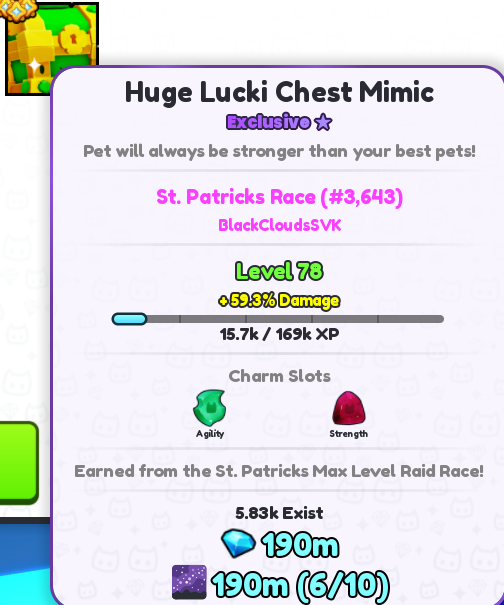
Seller: BlackCloudsSVK🎯 Safe and Legit✅ Very good price💎
Item type
Pets
Pet power
Huge
Rarity
Exclusive
15 people are viewing this item

About seller

BlackCloud
Regular SellerFAQs about Pet Simulator 99 Items
How does buying items in Pet Simulator 99 work on EB24?
Choose an item from the marketplace, complete your purchase, and then check out. After these moves, you’ll receive clear delivery instructions in your order panel. The whole process is handled through in-game item transfer, so you stay logged into your own account the entire time.
What kind of items can I buy?
Pet Simulator 99 offers a wide variety of items. These include Pets, Huge Pets, Golden and Rainbow variants, Currency, and other progression-related items. Each listing shows item type, rarity, and key attributes. This helps you choose which item suits you best.
How does delivery work?
Delivery is completed directly in-game. Simply follow the instructions shown in your order. They’ll explain how the item will be transferred to you, without requiring account access.
How long does delivery take?
Delivery time will always be displayed before checkout. Delivery times vary among offers. Some are instant, and some are completed within a specific time window of a few hours.
What if there’s a problem with the delivery?
Should you encounter any order-related issues, open an automated dispute directly from your order panel. It is designed to help resolve the problem clearly and fairly. Until the matter is resolved, your purchase protection remains.
How it works?
Buying items in Pet Simulator 99 on EB24 should be designed to be safe. And, it is. It’s also fully in-game. You select whatever item you want and complete the checkout before receiving it through a step-by-step delivery process.
Choose Your Item Browsing available Pet Simulator 99 items grants you access to Pets, Huge Pets, Currency, and other progression items. Each listing shows what it is (and its key attributes) to help you decide what works best for you.
Complete the Purchase After picking an item you favor, complete the purchase through EB24. Your order will appear instantly in your user panel.
Review Delivery Instructions Order-related delivery instructions will become available immediately after checkout. They’ll explain how the item are be transferred to you in-game.
Receive the Item In-Game Follow the detailed instructions to receive your item directly through in-game transfer. You do this while staying on your own account.
Order Protection Did the unexpected happen and you need to bring attention to the matter? Do so by opening an automated dispute from your order panel. It’ll effectively resolve any delivery issues you have. It’s a clear and fair system. In the meantime, your purchase protection remains until the matter is resolved.