




8-bit crown
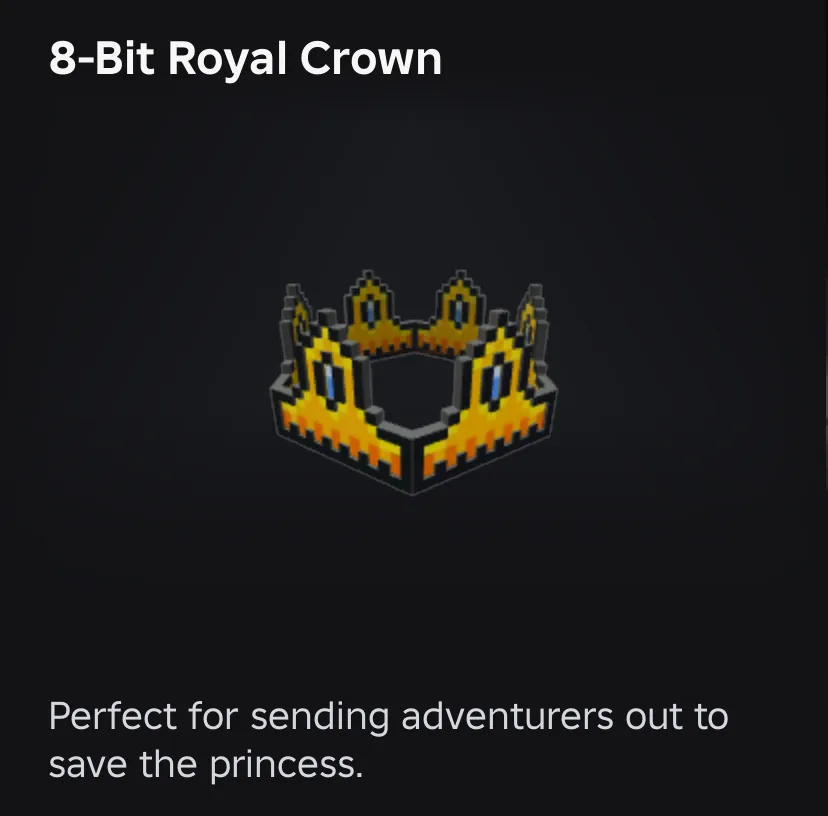
8-bit crown a limited from roblox !
Item type
Accessories
5 people are viewing this item

- Refund to your balance if not delivered
- Secure payment
About seller
shuridevs
RegularFAQs about Items
What Roblox Limiteds can I buy on EB24?
Listings are grouped into clothing, accessories and heads, with anything else under Other. Clothing covers shirts, pants and outfits. Accessories covers hats, back items and shoulder pieces. Heads covers head and face items. Every card names the specific limited rather than showing a thumbnail alone.
Why does the exact item name matter so much?
Because visually similar limiteds can sit at very different values. Two hats with near-identical thumbnails may have completely separate demand histories. Reading the name on the card, and confirming it in chat, is what stops you paying a high-demand price for a low-demand piece.
How is a Roblox Limiteds item delivered?
Through a trade. The seller states the method on the listing and the order panel repeats it after payment clears. Your credentials are never part of the process, so treat any request for a password or login code as a reason to stop and report the offer.
How long does the trade take?
Each listing shows Instant Delivery or a scheduled slot before checkout. Trades need both accounts available at the same time, so the realistic timing depends on the window you pick. Choose a slot you can actually attend rather than the earliest one on the page.
Why do two listings for the same limited differ in price?
Sellers price against current demand rather than a fixed rate, so quotes move over time. Delivery speed and seller rating explain much of the rest. Filtering to one category and lining up offers for the same named item is the quickest way to see the real spread.
Are limiteds still obtainable in game?
Not once the original stock has gone, which is the reason a resale market exists at all. That is also why the price on a listing reflects what buyers are currently paying rather than any original catalogue price the item may have launched at.
How do I sell Roblox Limiteds on EB24?
Add a payout method, then create a listing that names the exact item and the category it belongs to, along with a delivery window you can meet. After review the offer goes live, and the buyer payment is held in escrow until the trade is confirmed on the order page.
What if the wrong item arrives?
Screenshot your inventory after the trade and post it in Order Chat next to the listing details. Wrong-item cases are usually clear cut and settled there. If not, open a dispute from the order page inside your warranty window while escrow keeps the funds held.
How it works?
Buying LoL items on Eloboost24 is simple and clear. Here’s how the process works step by step.

Browse Available Items View EB24’s Anime Vanguard listings and compare units, upgrades, or other in-game resources. Every offer will provide detailed information so you know exactly what’s included before purchasing your order.
Complete the Purchase Once payment is confirmed, follow the instructions laid out via EB24’s secure checkout system. Your order will appear in your dashboard with full transparency. This includes exercising tracking and communication options.
Review Delivery Instructions Delivery instructions are displayed directly inside your order panel, describing how the in-game transfer works. Simply follow what you need to do for a smooth process.
Receive the Item In-Game The exchange is completed through safe in-game methods. Just follow the instructions to receive the item ordered. No login details are needed.
Order Protection Open the automated dispute from your dashboard if you encounter issues with your order. As part of your purchase protection, the system will clearly and fairly analyze your case before a decision is made.