




Can You Transfer Your League of Legends Account to Another Server?
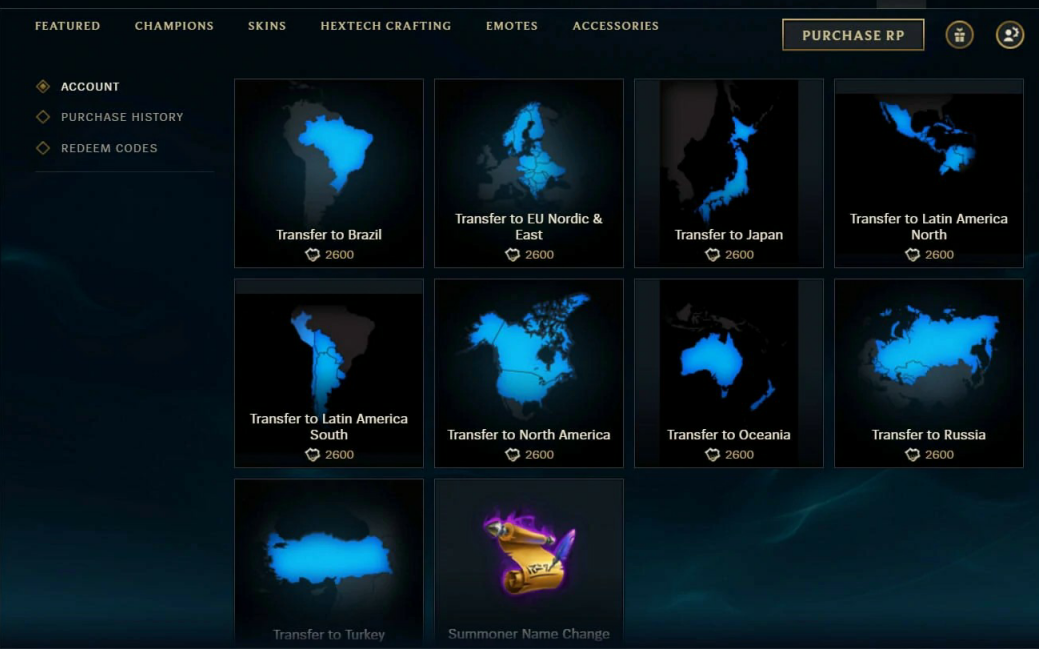
Yes, you can transfer your League of Legends (LoL) account to another regional server. While the process may seem complicated, it’s straightforward if you follow the right steps. In this guide, we’ll cover how to transfer your LoL account, the costs, cooldown period, and what happens after switching servers.
LoL Account Transfer: Cost & Cooldown
How Much Does It Cost to Transfer an LoL Account?
To transfer your account to another server, you need 2,600 Riot Points (RP) (approximately $23.00 USD). This is a non-refundable purchase once the transfer is completed.
Account Transfer Cooldown
After transferring your account, Riot Games applies a 90-day cooldown before you can transfer again. Be sure this is the right decision, especially if you play ranked mode, as transferring will reset your ranked progress.
Latency Considerations
The further away a regional server is from your actual location, the higher your ping (latency). If you're moving to a distant server, expect potential performance issues.
How to Transfer Your League of Legends Account
Open the League Client and log into your LoL account.
Go to the Store by clicking the store icon next to your RP and Blue Essence amounts.
Click the “Account” tab (profile and gear icon) on the left side of the Gifting Center.
Select “Server Transfer.”
Choose your desired destination server from the available list.
Pay the 2,600 RP transfer fee.
Confirm the purchase, log out, and log back in to complete the transfer.
League of Legends Regional Servers
LoL has multiple regional servers. Here’s the complete list:
Brazil (BR)
Europe Nordic & East (EUNE)
Europe West (EUW)
Japan (JP)
Latin America North (LAN)
Latin America South (LAS)
Middle East (ME)
North America (NA)
Oceania (OCE)
Russia (RU)
Southeast Asia (ID, MY, SG,PH,TW,TH)
Turkey (TR)
Troubleshooting LoL Account Transfers
If you experience issues while transferring, here are possible reasons and solutions:
1. Account Restrictions
If your account is banned, suspended, or restricted, you cannot transfer it.
Active support tickets may also block a transfer. Check Riot Support for any unresolved issues.
2. Insufficient RP Funds
Ensure you have 2,600 RP before attempting the transfer.
If you don’t have enough RP, purchase it in the in-game store first.
3. Patch Days & Server Maintenance
Riot disables transfers during patch updates to prevent mismatched client versions.
Wait until maintenance is over before trying again.
4. Regional Transfer Restrictions
Some servers may have temporary transfer restrictions due to regional updates.
Always check availability before purchasing a transfer.
5. Technical Issues
Ensure you have a stable internet connection.
Restart your League Client.
If issues persist, reinstall the game.
🔹 Still having trouble? Take a screenshot of any error messages and submit a ticket to Riot Support with your Riot ID, current server, and desired server.
How to Check Your LoL Region
Launch the League of Legends client.
Log in using your Riot ID.
Hover over your profile picture (top-right corner).
A pop-up will display your current region.
Knowing your current region helps you decide whether transferring is a good idea based on latency and matchmaking differences.
LoL Account Transfer Consequences
Transferring your account resets certain progress, especially in ranked mode. Here’s what carries over and what you lose:
✅ What You Keep:
BE (Blue Essence) & RP
Champions, Skins, Emotes & Icons
Hextech Crafting Inventory
Summoner Level & Rune Pages
Riot ID & Friends List
XP Boosts & Statistics
❌ What You Lose:
Ranked Placement & MMR (Matchmaking Rating)
Clash Club Affiliations & Progress
Event & Mission Progress
Forum Badges & Victory Points (VP)
Your Shop Offers
Final Thoughts
Transferring your League of Legends account is a big decision that comes with consequences. If you’re a ranked player, you’ll lose your MMR and placement, meaning you must start fresh in unranked mode.
Before making the switch: ✔ Check if account transfers are available in the store. ✔ Ensure you have enough RP. ✔ Be prepared for a 90-day cooldown. ✔ Consider latency issues if moving to a distant server.
Many players switch servers to join friends or explore new challenges. If you're ready for the move, enjoy your fresh start in a new League of Legends region! 🚀
You might also like